From Code to Cloud: How to Fax-Enable Your Web App in Under Two Hours

In today’s hyper-connected digital landscape, you’d be forgiven for thinking the fax machine was a relic of the 1980s, destined for the same museum wing as the rotary phone and the floppy disk. However, if you work in healthcare, legal, or finance, you know the reality is quite different. Faxing remains a cornerstone of secure document exchange, often mandated by regulation or ingrained in mission-critical workflows.
But here is the million-dollar question: Why does integrating fax capabilities into a modern web application still feel like you’re trying to build a bridge between two different centuries?
For many developers, the mere mention of “fax integration” conjures up nightmares of archaic T.30 protocols, expensive BrookTrout fax boards, and finicky telephone lines. It feels heavy, slow, and completely at odds with the “move fast and break things” ethos of modern cloud development.
Let’s break it down. It shouldn’t take a month of specialized engineering to send a PDF from your app to a healthcare provider’s fax machine. At Ingenium, we believe it should take less time than a long lunch break. By leveraging our RESTful Fax API, you can move from code to cloud in under two hours. (Contact us for a developer test account)
Here is how we turn a legacy headache into a developer’s dream.
The RESTful Revolution: Faxing for the 21st Century
In essence, our API treats a fax just like any other data object in your web stack. Because our infrastructure is built on a RESTful architecture, it follows the same patterns you already use for every other service in your application.
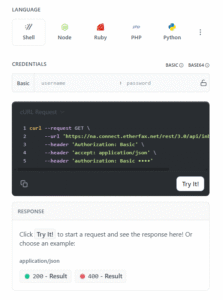
Whether you are building in Node.js, Python, Ruby, or .NET, the process is consistent. You aren’t wrestling with proprietary drivers; you are making simple GET and POST operations. This simplicity is one of the standout advantages of working with Ingenium. We’ve abstracted the complexity of the global PSTN (Public Switched Telephone Network) into a clean, developer-friendly interface.
Flexibility in Data Exchange
Modern developers demand flexibility. That’s why our API supports both JSON and XML formats. This ensures that regardless of your legacy requirements or your modern preferences, the data exchange remains seamless. You can send metadata, track statuses, and manage your account using the formats that best fit your existing codebase.
The 2-Hour Sprint: Getting Started
You might be skeptical about the “two-hour” promise. We get it. But when you look at the documentation, you’ll see why it’s a reality. We recommend all our developers start at the EtherFAX API Documentation, which serves as the definitive reference for our underlying engine.
The logic is straightforward:
- Authentication: Secure your connection using API keys.
- Payload Preparation: Wrap your document (PDF, TIFF, etc.) in a standard POST request.
- Transmission: Hit the endpoint and let the cloud handle the rest.
This rapid implementation isn’t just about saving developer hours; it’s about business agility. In a world where disaster recovery strategies and digital transformation move at lightning speed, you can’t afford to be bogged down by infrastructure hurdles.
Diving into the Controllers: Outbox, Inbox, and Beyond
To make the integration as intuitive as possible, the API is organized into logical controllers. These controllers mirror the way you actually think about document flow.
The Outbox Controller
This is where the magic happens for outbound communications. Sending a fax is a simple POST operation. You provide the destination number, the document content, and any specific options (like resolution or priority). The API handles the queuing, dialing, and retries.
The Status Controller
Once a fax is in flight, you need to know what’s happening. Is it pending? Is the line busy? Was it successfully delivered? The Status controller allows you to poll for updates or, even better, configure webhooks so your application is notified the second a transmission completes. This level of real-time visibility is crucial for healthcare automation, where knowing a prescription or referral arrived is vital for patient care.
The Inbox Controller
Receiving faxes is just as easy as sending them. Instead of a physical machine spitting out paper, your web app can use a GET operation to retrieve new documents from your digital “Inbox.” These are delivered as high-quality digital files, ready to be parsed, stored, or displayed in your UI.
Webhook Fax
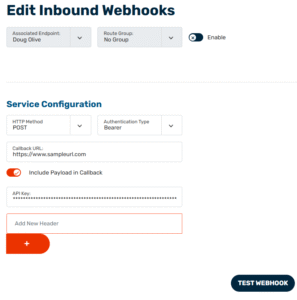
For those that are a fan of using a webhook, you can very quickly and easily create a Webhook in our portal for sending and receiving a fax. You just need your callback url and credentials to start sending outbound fax thru our webhook. When a new fax is received, our fax webhook will fire a notification to your callback url with the fax as a pdf. We support AI prompts that can use our AI Insights to create a summary about the fax document to pass along to you in a JSON payload.
Compliance as a Feature, Not a Hurdle
When we talk about healthcare-focused apps, the conversation inevitably turns to security. You aren’t just sending documents; you are sending Protected Health Information (PHI). This is where many “cheap” online fax services fall short.
Ingenium’s API isn’t just a communication tool; it’s a security fortress. We prioritize HIPAA and HITRUST compliance because we know that for our clients, a data breach isn’t just an IT issue: it’s a legal and ethical disaster.

Our infrastructure ensures that data is encrypted both in transit and at rest. Unlike traditional faxing, which might leave sensitive documents sitting on a communal tray in a busy hallway, our API-driven cloud faxing ensures that documents go directly from your secure application to the intended recipient’s secure endpoint. For a deeper dive, check out our insights on why your business needs secure cloud faxing.
Real-World Impact: Why This Matters
This efficiency boost is a testament to the power of modern cloud architecture. Consider a large hospital system that needs to integrate faxing into their custom EMR (Electronic Medical Record) portal. In the old world, this would require a team of specialists and months of testing. With our RESTful API, a single developer can fax-enable the entire application in an afternoon.
This begs the question: What could your team accomplish if they weren’t wasting weeks on legacy integrations?
By choosing a fax API that is built for developers, you are:
- Eliminating the need for on-premise hardware and expensive phone lines.
- Dramatically reducing the time-to-market for new features.
- Ensuring 100% compliance with the strictest industry regulations.
- Creating a paperless environment that supports modern sustainability goals.
The scalability of our fax cloud means you never have to worry about “busy signals” again. Our infrastructure handles the bursts in traffic, whether you’re sending ten faxes or ten thousand.

Implementation Guidance: Tips for a Smooth Launch
While the API is simple, a few best practices will ensure your two-hour implementation is a total success:
- Leverage the Docs: Don’t reinvent the wheel. Use the EtherFAX documentation as your North Star.
- Use Webhooks: Instead of constant polling, set up webhooks for status updates. It’s more efficient for your server and provides a better user experience.
- Think About Error Handling: Even the best systems encounter busy signals or wrong numbers. Build robust logic in your app to handle these scenarios based on the detailed error codes our API returns.
- Test with JSON and XML: If you’re building a multi-tenant app, ensure your logic can handle both formats to give your end-users maximum flexibility.
Bringing it All Together
In today’s rapidly evolving digital age, the “old way” of doing things is no longer an option. However, that doesn’t mean we can ignore the persistent need for reliable, secure document transmission. The bridge between legacy requirements and modern innovation is the API.
Ingenium provides that bridge. By offering a HIPAA compliant online fax solution that developers actually enjoy using, we are helping businesses move away from the clunky hardware of the past and toward a streamlined, automated future.
Whether you are looking to eliminate the paper trail to save costs or you need to ensure HIPAA compliance for medical faxing, the path forward is clear.
Now is the time to stop treating fax as a burden and start treating it as a feature. With Ingenium, you can have your web application fax-enabled before the end of the day.
Ready to get started? Explore our services or reach out to our team at Ingenium Support to begin your 2-hour integration journey. Let’s bring your application into the cloud era, one fax at a time.