ETHERFAX Engage
The Cloud Fax Client That Retires Your Fax Server
Fax remains a critical communication channel for healthcare providers, insurance organizations, government agencies, and enterprises. Yet many organizations still depend on aging fax servers, physical machines, and legacy copper phone lines, or analog terminal adapters, which are expensive to maintain and difficult to scale.
The question is no longer whether your organization needs fax. It is whether your fax infrastructure is ready for the way your business operates today.
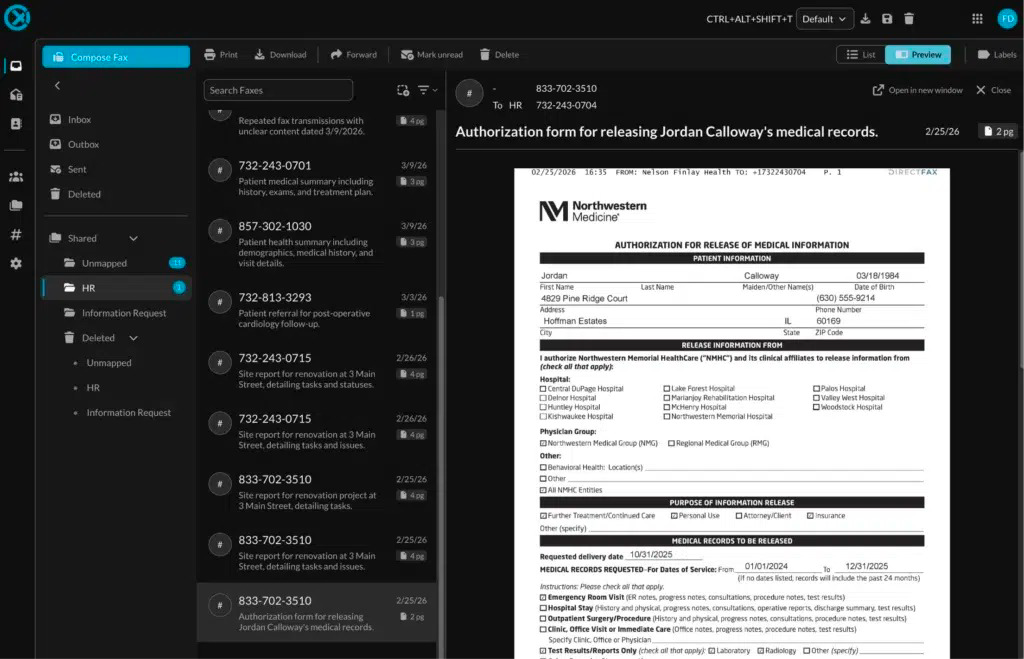
ETHERFAX Engage provides a modern answer: an AI-enabled, web-based cloud fax client that lets teams send, receive, view, and manage documents securely from a browser. It replaces legacy fax servers and physical fax machines while preserving the workflows and fax numbers your organization depends on.
Let’s break down what Engage does, how migration works, and where it fits alongside ETHERFAX Flow.
What Is ETHERFAX Engage?
ETHERFAX Engage is a secure cloud fax management application accessible from any web browser. There is nothing to install. Instead of relying on a dedicated fax server or a machine located in a copy room, employees can manage fax communications from their seats, through a browser-based interface.
With Engage, your team can:
- Send and receive faxes from a secure web application
- View incoming and outgoing fax activity from a centralized workspace
- Fax PDFs, Microsoft Office documents, images, and text files
- Avoid printing and scanning documents before transmission
- Collaborate through shared workspaces and team inboxes
- Apply role-based access controls to protect sensitive information
- Review audit logs and reporting for greater operational visibility
- Use AI-powered document summaries to prioritize incoming faxes
Unlike traditional fax infrastructure, Engage does not require your IT team to maintain a physical fax server, manage dedicated phone lines, or troubleshoot fax hardware at every location.
And because it is browser-based, staff can work securely from the office, a remote location, or another approved business environment.
Why Retire a Legacy Fax Server?
Legacy fax servers can remain functional for years, but “still working” is not the same as being efficient, resilient, or cost-effective.
Traditional infrastructure often creates challenges such as:
- Aging hardware and specialized fax boards
- Dependency on copper lines or other legacy telephony
- Limited visibility into departmental fax activity
- Manual user and permissions management
- Difficult upgrades and maintenance windows
- Physical document handling and printing
- Inconsistent workflows across locations
- Higher support costs when systems fail
For an IT Director or Technology Manager, the fax server may be only one more aging platform competing for attention alongside new version releases, security updates, cloud initiatives, compliance requirements, and business continuity planning.
This begs the question: why continue investing in infrastructure that your organization no longer needs or that is not that modern?
ETHERFAX Engage moves fax management into a secure elastic-cloud environment in AWS, while allowing users to continue performing the business tasks they already understand. The result is a more manageable platform for IT and a more accessible experience for employees.
A Three-Phase Migration Without Workflow Disruption
One of the standout advantages of Engage is the migration approach. Organizations do not have to replace their entire fax environment overnight or force every employee to learn a new process on day one.
The transition can occur in three practical phases.
1. Route fax traffic away from legacy infrastructure
On day one, fax traffic can be routed away from aging copper lines and legacy telephony infrastructure through the ETHERFAX network.
This initial step can happen without changing the way end users work. Existing applications, devices, and processes can continue operating while the underlying fax delivery infrastructure is modernized.
That means your organization can begin reducing its dependence on legacy infrastructure immediately, without creating unnecessary disruption for clinical, administrative, claims, or customer service teams.
2. Transition teams to Engage
Once fax traffic is operating through the cloud, teams can gradually begin using Engage for
day-to-day fax management.
Employees can send documents directly from supported file formats rather than printing and scanning them first. Departments can work from shared inboxes, and administrators can define access based on roles and responsibilities.
For example:
- A healthcare referral team can share an inbox for incoming referral documents.
- An insurance claims department can delegate incoming claim-related faxes to authorized staff.
- A legal or government team can manage documents by department while maintaining centralized oversight.
- A finance department can send signed forms or purchase orders without relying on a physical fax machine.
This phased adoption gives teams time to become comfortable with Engage while maintaining business continuity.
3. Port fax numbers and sunset the legacy fax server
After teams are operating comfortably in Engage, Ingenium can help coordinate the porting of your fax numbers. Once number porting is complete and traffic is confirmed, the organization can retire its legacy fax server.
The outcome is a cloud-first fax operation with fewer hardware dependencies, reduced maintenance overhead, cyber-resiliency and a clearer path for future growth.

Collaborative Workspaces and Centralized Administration
Fax workflows rarely belong to one person. In healthcare, insurance, and government environments, multiple employees may need to review, assign, respond to, or archive the same incoming document.
Engage supports this reality through shared workspaces and team inboxes.
Rather than sending every fax to one employee’s desktop or email address, organizations can create collaborative workflows in which authorized team members access the same queue. This can help reduce missed documents, improve response times, and support coverage when someone is out of the office.
- Administrators can also manage the environment centrally with:
- Role-based access controls for appropriate permissions
- Centralized administration across users and departments
- Audit logs that record relevant activity
- Reporting for fax operations and performance monitoring
- Shared departmental workspaces for collaborative processing
These controls are particularly important when faxed documents contain protected health information, insurance records, financial data, or other sensitive content.
No system is entirely foolproof, and access policies still require thoughtful configuration. In our opinion, centralizing administration gives your IT and compliance teams a stronger foundation for managing fax activity consistently, while supporting regulatory initiatives.
AI-Powered Summaries Help Teams Prioritize Incoming Faxes
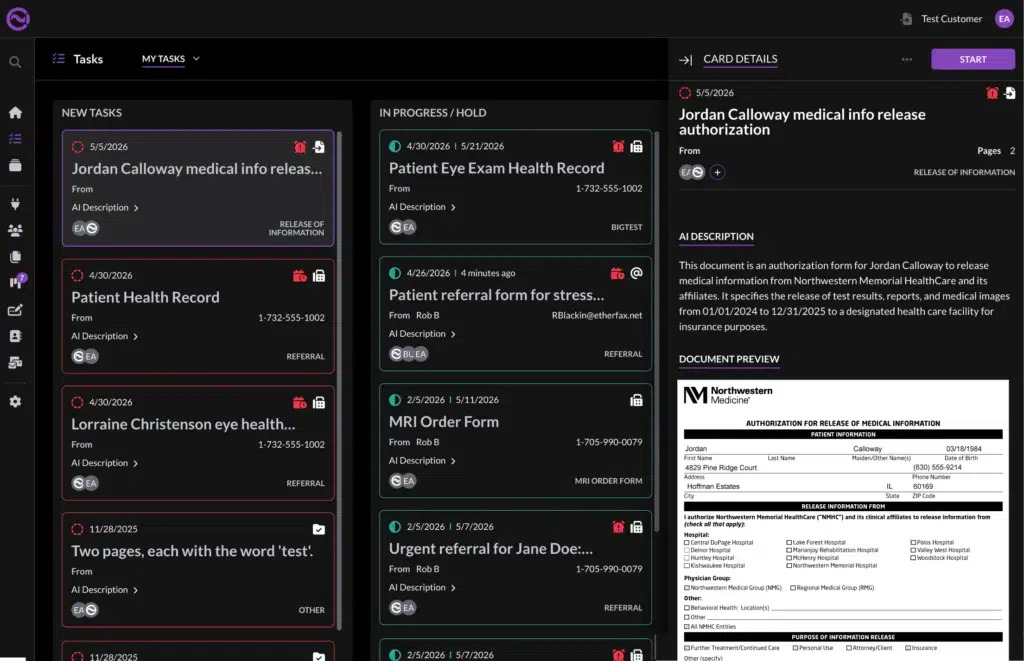
A fax identified only by a sender’s phone number gives your staff very little context. Employees may need to open documents one by one simply to determine what arrived and whether it requires immediate action.
Engage adds AI-powered document summaries to improve that first step.
Before acting on an incoming fax, staff can see information about the sender and a high-level overview of the document. This can help teams identify whether a fax involves:
- A patient referral
- A prior authorization request
- An insurance claim
- A medical record
- A purchase order
- A government form
- A time-sensitive business request
The summary is designed to support triage, not replace human judgment. Staff should continue reviewing documents and following organizational procedures, especially when decisions involve patient care, claims, legal obligations, or financial commitments.
Still, giving employees context earlier in the process can reduce unnecessary searching and help them focus attention where it matters most.
Engage and Flow: Two Different Roles in the Same Workflow
Because both products use AI and support document workflows, it is important to understand the difference between ETHERFAX Engage and ETHERFAX Flow.
Engage is the cloud fax client
Engage is focused on document delivery and fax management. It helps your team send, receive, view, and manage fax communications through a secure web application.
Think of Engage as the workspace your employees use to manage fax activity.
Flow is the AI digital mailroom
ETHERFAX Flow goes further into document processing. It acts as an AI-powered digital mailroom that can:
- Open incoming documents
- Classify them by type
- Extract relevant information
- Summarize content
- Route documents to the appropriate team or system of record
In essence, Engage delivers and manages the documents, while Flow helps open, understand, sort, and route them.
A healthcare organization might use Engage to receive faxes and Flow to identify referrals, extract key details, and route documents into an EHR. An insurance company might use Engage for centralized fax management and Flow to sort claims-related documents before sending them to the right processing queue.
The two solutions work together to create a progression from reliable cloud faxing to intelligent document automation. You can learn more about ETHERFAX Flow and how it supports repetitive document-processing work.
Integrate with the Systems and Devices You Already Use
Modernization does not mean abandoning every tool your staff already relies on. ETHERFAX Engage integrates with scanners and multifunction printers (MFPs) from manufacturers including:
- Canon
- Ricoh
- Xerox
- Lexmark
It also supports connections with systems such as Epic, Hyland OnBase, Salesforce, Athena and PointClickCare, helping organizations incorporate fax into existing healthcare and content management workflows.
That flexibility matters because many organizations still need to fax from an MFP, scan documents at a nursing station, or exchange files through an EHR. Engage helps connect these familiar tools to a modern cloud fax environment.
Security and Compliance for Mission-Critical Faxing
Organizations handling sensitive information must evaluate more than usability and cost. Security and compliance are paramount.
ETHERFAX Engage operates in an environment meeting requirements associated with:
- HIPAA
- SOC 2
- HITRUST CSF R2
- PCI DSS 4.0.1
- NIST v1.1
These frameworks and requirements are especially relevant to healthcare, insurance, financial services, government, and enterprise organizations.
Compliance is not a substitute for sound internal policies. Your organization still needs appropriate user access reviews, retention practices, incident-response procedures, and employee training. In our opinion, selecting a platform designed for regulated environments can simplify the process of building a defensible, secure fax strategy.
You can also review Ingenium’s guidance on cloud fax services and secure faxing for healthcare organizations.
How Ingenium Supports Your Engage Migration
The technology is important, but implementation determines whether a fax modernization project succeeds.
Ingenium brings nearly 30 years of fax industry experience to the process. We can help your organization:
- Assess current fax infrastructure and workflows
- Identify legacy servers, lines, devices, and applications that should be migrated
- Design a phased transition plan
- Route fax traffic to the cloud
- Configure users, workspaces, roles, and integrations
- Coordinate fax number porting
- Validate inbound and outbound workflows
- Support teams during adoption and cutover
- Retire legacy infrastructure when the migration is complete
Our team understands that healthcare referrals, insurance claims, government records, and enterprise transactions cannot simply be paused during a technology project. We focus on preserving continuity while improving reliability, visibility, and operational efficiency.
Modernize Fax Without Losing What Works
“Modernizing your fax infrastructure with ETHERFAX is more like a lift-and-shift, than a disruptive rip-and-replace project”, says Doug Olive, President of Ingenium Software. With ETHERFAX Engage, organizations can move away from physical fax machines, copper lines, and legacy fax servers through a phased transition designed around existing workflows.
You gain:
- Secure browser-based fax management
- Shared team workspaces and inboxes
- Centralized administration and reporting
- Role-based access controls and audit logs
- AI-powered document summaries
- Support for common document formats
- Integration with MFPs, scanners, Epic, Athena, Salesforce, PointClickCare, Hyland OnBase, and more
- A practical path toward automated processing with ETHERFAX Flow
If your organization still depends on legacy fax infrastructure, now is the time to evaluate what it costs to maintain, and what your teams could accomplish with a more flexible platform.
Contact Ingenium to discuss your current fax environment, migration goals, and the right path to ETHERFAX Engage.